


Barnes & Noble NOOK
4.455.27K Reviews
App Specs
- Version
- Varies with Device
- Updated On
- License
- Free
- Downloads
- 10,000,000+
- Developer
- Barnes & Noble
- Categories
- Books & Reference
- Platform
- Android, iOS
Screenshots
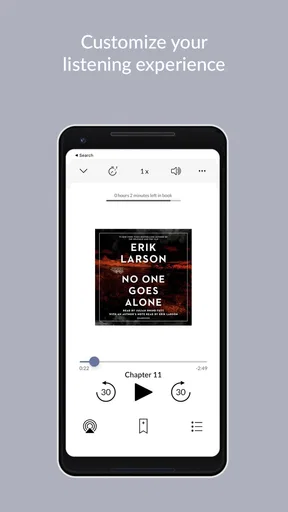
 Analysis by AppCompare
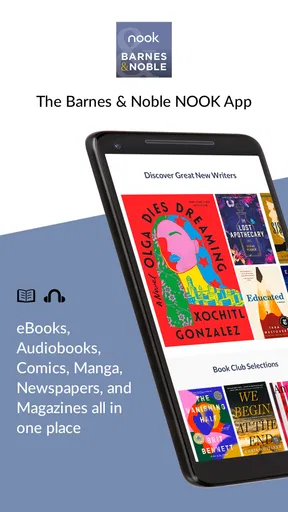
Ever found yourself craving a good read but tired of lugging around heavy books? Enter Barnes & Noble NOOK, the app that promises to revolutionize your reading experience. Let me take you on a little tour of what this app has to offer and why it might just become your new best friend.
Reading that follows you from place to place
The detail that matters most to me in NOOK is the ability to sync reading across devices. It turns a phone and a tablet into two places to continue the same book, rather than separate shelves that need managing. That can make a real difference if you read in short bursts: a few pages while waiting for an appointment, then a longer stretch at home. I like this kind of continuity because it makes it easier to use the time I actually have, instead of waiting for the perfect quiet hour.
NOOK is a free Books & Reference app from Barnes & Noble, and it has been available since July 22, 2010. Its average rating is 4.3 from around 176,000 ratings, with more than 10 million installs. Those figures suggest that it has found a substantial audience, but they do not tell me whether its reading style suits everyone. The useful question is whether you want a mobile reading library connected to a particular bookseller, or simply the most flexible way to read files you already own.
Getting Started with NOOK
First things first, installing the Barnes & Noble NOOK app is a breeze. Available on both Android and iOS, it’s just a quick download away from a world of literary adventure. Once installed, the app greets you with a clean and intuitive interface. It's all about simplicity here, folks. No clutter, just a straightforward pathway to your next great read.
In practice, the app is easiest to judge by trying a small routine rather than planning a major reading overhaul. Open a book when you have a spare moment, make a note or bookmark if something catches your attention, and see whether it feels natural to return later on another device. That workflow is more revealing than browsing screens for a few minutes: the appeal is not only finding a title, but keeping your place and thoughts together as reading moves between everyday settings.
One practical point for a first-time reader is that the app and the books are not the same thing. The app is free, while choosing a book is a separate decision inside the reading experience. I would browse with a particular interest in mind—perhaps a subject you want to explore or an author you already enjoy—rather than treating every recommendation as a reason to buy. That keeps discovery useful and helps you decide whether NOOK’s catalog and purchasing route fit the way you prefer to choose books.
Browsing and Buying Books
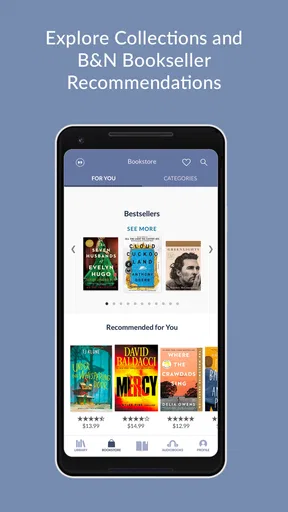
Imagine walking into a bookstore with an endless selection of books. That’s exactly what NOOK offers, but straight from your device. You can browse through a vast catalog that includes bestsellers, new releases, and even hidden gems. The browsing experience is as smooth as it gets, with categories and recommendations tailored to your reading history.
Worth Reading Before You Choose

Flipboard Shows What News Apps Must Do Beyond the Feed

Switching to Android Auto Means Rethinking Your Driving Routine

Google Calendar Makes a Crowded Week Easier to Manage

Ludo King Makes the Most of the Minutes Between Plans

Baby Panda World Brings Quick Play to Modern Phones, but Its Game Library Feels Busy

ESPN’s Live Game View Makes Following Close Games Easier
Buying books is also a seamless process. A few taps and you’re done. It’s like having a bookstore in your pocket. Plus, there are often deals and discounts that make it even more enticing. Who doesn’t love a good deal?
My advice is to treat browsing as a way to narrow down possibilities, not as a substitute for deciding what kind of reading you want. Recommendations shaped by reading history can be helpful when you want another book in a familiar vein, but they can also keep your attention circling the same tastes. When I want something different, I would deliberately explore categories outside my usual choices and compare a few options before buying. That small habit makes the discovery side more useful and reduces the chance of choosing a title simply because it appeared first.
This is also where NOOK differs from a general-purpose reading app. A bookseller’s app puts shopping and reading close together, which is convenient if you want to discover and acquire books in one place. A file-focused reader may be a better fit if your priority is bringing together documents or books from multiple sources. If you mainly read borrowed books through a library service, a library-centered app may suit that routine better. I would choose based on where your reading material comes from, not just on how tidy the bookshelf looks.
Reading Experience
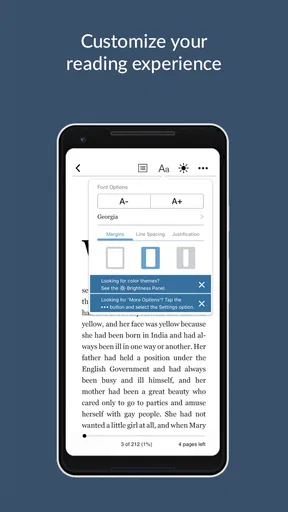
Now, let’s talk about the heart of the app: the reading experience. NOOK offers a customizable reading interface. You can adjust the font size, background color, and even line spacing to suit your preferences. It’s designed to make reading comfortable, no matter the lighting conditions or how long you plan to read. You can lose yourself in a book for hours without any strain on your eyes.
Those adjustments are worth making before settling into a long session. I would try a slightly larger font and a different background, then read several pages rather than judging by the first screen. A layout that looks attractive in a preview may feel cramped after a chapter. The useful trade-off is that personalization can make digital reading more comfortable, but a phone screen still asks you to read on a small device. If extended sessions are your main use, a larger screen or a dedicated e-reader may feel more pleasant than a phone, even when the app itself is easy to use.
Bookmarking, highlighting, and taking notes are features that every bookworm will appreciate. They make it easy to reference your favorite passages or jot down thoughts without interrupting the flow of your reading.
I find these tools most valuable when I give them a purpose. A bookmark can mark the point where I stopped, while a highlight can save a passage I may want to revisit; a note is better for recording why the passage mattered to me. Used together, they can turn a book into something easier to return to for study or discussion. Used on every other line, they can become a second task that breaks the pleasure of reading. A light touch keeps the story moving while still leaving useful signposts.
Making the handoff work in everyday life
Picture a normal weekday: I start a chapter on my phone during a commute, put the device away when I arrive, and later open the book on a tablet at home. That is the clearest reason I would value syncing. It helps when reading time is fragmented, and it removes the small annoyance of trying to remember a page or passage. The feature is less important if you always read on one device, so I would not make it the sole reason to choose the app. Its payoff depends on whether switching screens is part of your actual routine.
When moving between devices, I would make a simple habit of closing a reading session at a natural stopping point and checking the book again on the other screen before continuing. This is not a complicated setup; it is just a sensible way to make sure the transition feels smooth. For a reader who annotates heavily, it is also worth checking that the notes and highlights are available where they expect to continue. That is a better test than assuming every part of a reading routine will feel identical on every device.
Extra Features
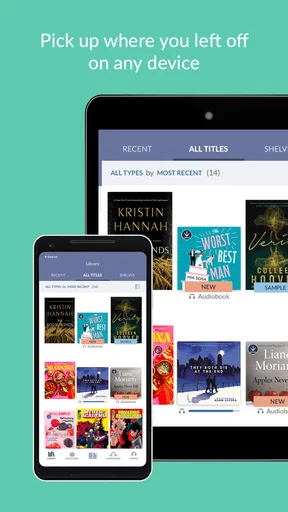
What’s a good app without a few extra goodies? NOOK offers a few surprises that make it stand out. One of my favorites is the ability to sync across devices. Start reading on your phone during your commute and pick up where you left off on your tablet at home. It’s incredibly convenient.
There’s also a social aspect to NOOK. You can share your reading progress and favorite books with friends. It’s a nice way to connect with fellow readers and maybe even spark a conversation or two about your latest reads.
Sharing is most useful when it supports a real conversation: recommending a book to a friend, or giving someone a starting point for a discussion. I would not choose a reading app primarily for its social side, though. Some readers like keeping their reading private or prefer to talk about books in person, and there is nothing wrong with using the app only as a personal library. The social tools are an extra, not a requirement for getting value from reading.
Where the trade-offs show
NOOK’s strongest fit is for someone who wants a straightforward path from discovering a book to reading it, with the option to pick up across devices. Its main trade-off is that this integrated bookseller approach may not match every reader’s habits. If you already organize a personal collection elsewhere, prefer borrowing as your main source, or want one reader for materials from many different places, another app may be more convenient. I would also skip it if the priority is a dedicated e-reader experience rather than reading on a phone or tablet.
For readers who do choose it, the best approach is to use the parts that solve an actual problem: adjust the text for comfort, bookmark a stopping point, save only meaningful passages, and take advantage of device syncing when your day moves between screens. That avoids turning helpful tools into clutter. NOOK is rated for Teen audiences, a relevant detail for families considering what kind of app is being installed, though an age rating is not a substitute for choosing books appropriate to an individual reader.
Final Thoughts
All in all, the Barnes & Noble NOOK app is a must-have for anyone who loves to read. Whether you’re a casual reader or a book enthusiast, it offers something for everyone. The ease of use, vast selection, and thoughtful features make it a standout choice in the world of reading apps.
If you’re looking to make your reading experience more accessible and enjoyable, give NOOK a try. Who knows? You might just find your next favorite book waiting for you there.
My recommendation is a little more specific: it is worth trying if you want a reading app tied to Barnes & Noble’s book discovery and buying experience, and especially if you regularly move between a phone and tablet. It may be less suitable if you want a neutral reader for a collection assembled from many sources or if your ideal setup is a dedicated reading device. For a busy reader who likes to use small pockets of time, though, the combination of adjustable text, annotations, and a continuing place across devices makes it a practical option rather than just another digital bookshelf.
Pros
- Extensive digital library available.
- User-friendly interface for easy navigation.
- Syncs across multiple devices seamlessly.
- Offers both ebooks and audiobooks.
- Customizable reading settings for comfort.
Cons
- Limited social sharing options.
- Occasional app crashes reported.
- In-app purchases can be pricey.
- Some features require internet connection.
- Less diverse than other ebook platforms.
FAQs for Barnes & Noble NOOK
What is Barnes & Noble NOOK and what can I do with it?
Barnes & Noble NOOK is a digital app that allows you to read eBooks, magazines, and newspapers. It provides access to a vast library of titles across various genres. You can customize your reading experience with adjustable fonts and backgrounds, bookmark pages, and even make annotations. It’s perfect for avid readers who want access to a digital library on their mobile devices.
Is the Barnes & Noble NOOK app free to use, and are there any subscription fees?
The Barnes & Noble NOOK app is free to download on both Android and iOS platforms. While the app itself does not require a subscription fee, you will need to purchase eBooks and other digital content. Occasionally, free books and samples are available, but most popular titles require a purchase.
What devices are compatible with the Barnes & Noble NOOK app?
The Barnes & Noble NOOK app is compatible with most Android and iOS devices. This includes smartphones and tablets running on Android 6.0 or later and iOS 12.0 or later. It’s also available on NOOK eReaders. Always check for the latest version to ensure compatibility with your device.
Can I read books offline using the Barnes & Noble NOOK app?
Yes, you can read books offline with the Barnes & Noble NOOK app. Once you've downloaded a book to your device, it’s stored locally, allowing you to read without an internet connection. This feature is especially useful for reading on the go or in areas with limited connectivity.
How does Barnes & Noble NOOK protect my privacy and personal information?
Barnes & Noble NOOK takes privacy seriously, employing encryption and secure connections to protect your personal information. They follow industry standards to ensure your data is safe, especially during transactions. Users can manage privacy settings within the app, and it’s advisable to review the privacy policy regularly for updates.


